
Microsoft is testing a brand new Bluetooth audio enhancement in Windows 11 that could make wireless headphones sound better during voice calls, gaming sessions and other activities that use the system’s microphone. The upgrade enables supported Bluetooth LE Audio devices to sustain full-range stereo playback while their microphone is functioning.
The change arrived in the Windows Insider Experimental channel on November 20, 2026, giving testers availability to a new 48kHz audio format. It resolved a longstanding restriction that causes many Bluetooth headphones to shift to lower-quality audio whenever a program uses the microphone.
Windows 11 integrates a 48kHz stereo feature for Bluetooth headphones
Microsoft launched the improvement with Windows 11 Insider Preview Build 26340.10032. Based on its November 20 release, supported Bluetooth LE Audio devices can now keep full-range stereo fidelity while the microphone is being used by a program.
The new feature offers 2 channels, 16-bit, 48000 Hz playback. This is specifically convenient when users play games while using voice chat, joining an online meeting, using voice typing or making a call.
Earlier, activating a Bluetooth headset microphone could allow Windows to shift the audio connection into a lower-quality mode. The new feature is developed to maintain stereo playback on compatible hardware instead.
Microsoft states the feature is also applicable to various circumstances, including game chat, voice calls and voice chat in Copilot Chat.
Reason for Bluetooth headphones losing audio quality when accessing the microphone
The issue is associated with how traditional Bluetooth audio profiles function.
When users watch videos or listen to music without using the microphone, Windows system use the Advanced Audio Distribution Profile (A2DP) for high-quality stereo playback on the other hand traditional Bluetooth Classic audio uses the Hands-Free Profile (HFP) when the headset microphone is required. This profile backs the two-way communication but traditionally functions in mono, decreasing the quality of playback….
Bluetooth LE Audio launched newer capabilities that can enhance the experience of this feature. Microsoft’s new Insider feature takes this further by enabling supported devices to use full-range stereo playback at 48kHz while the microphone stays active.
This is not a widely available change to every Bluetooth headset. It relies on the system, drivers, Bluetooth hardware, and connected audio device.
Related: Windows Code 10 USB Audio Error: Fix After Update (2026)
Hardware requirements for the new Bluetooth feature
Windows users will require supported hardware to benefit from the upgrade.
Microsoft pointed out two specific requirements:
- A Windows PC that supports Super Wideband Stereo and Bluetooth LE Audio.
- Bluetooth LE Audio speakers, headphones and earbuds that are compatible with 48kHz playback
Just having a Bluetooth connection does not ensure compatibility. Even a computer advertised with Bluetooth LE support might not have the required hardware capabilities and audio drivers.
To verify if your system is compatible with Bluetooth LE Audio, go to Settings > Bluetooth & devices > Devices. Find the Use LE Audio when available option.
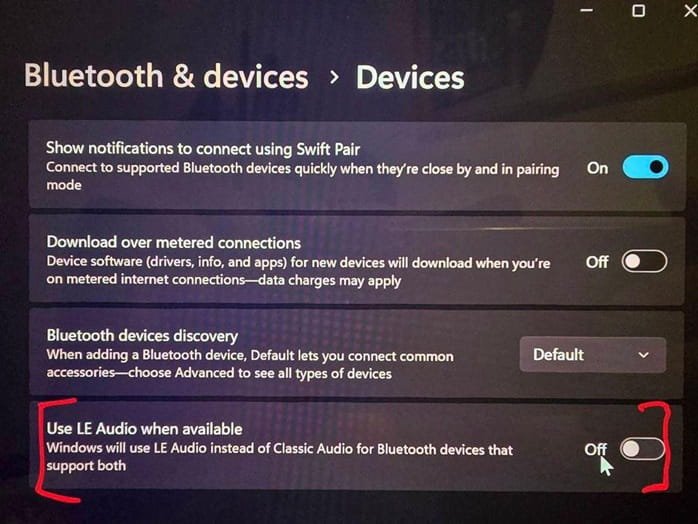
If this option is not available, your system is not currently compatible with LE Audio. The lack could be linked to incompatible drivers and hardware limitations.
You should also review your headphone manufacturer’s specifications for 48kHz playback support and Bluetooth LE Audio.
Related: How to Fix Bluetooth not Working in Windows 11 Problem (Solved!!)
Enable 48kHz Bluetooth stereo audio in Windows 11
If your computer and Bluetooth headset aligns with the requirements and have received the preview feature, follow the steps mentioned below:
1. Connect your supported Bluetooth LE Audio headset to your computer.
2. Go to Settings by pressing the Windows + I keyboard shortcut.
3. Go to System > Sound.
4. Choose your Bluetooth device under Output.
5. Expand Output settings.
6. Look for the Format when microphone is active option.
7. Select 2 channels, 16-bit, 48000Hz.
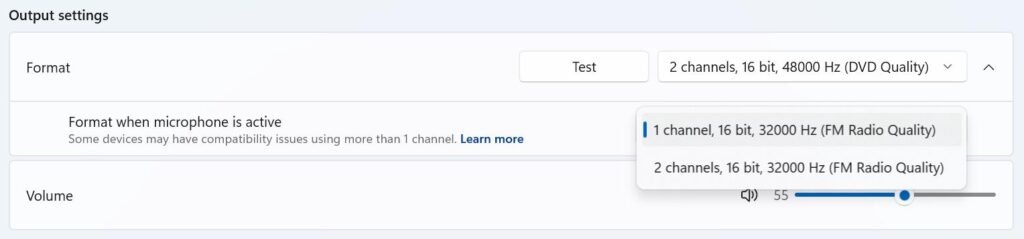
This option enables compatible devices to keep stereo playback when the microphone is active.
If you do not see the latest 48kHz setting, your system may not meet the requirements or may not have the feature yet.
When will Microsoft roll out this feature to every user?
The 48kHz Bluetooth stereo enhancement is now being tested through the Windows Insider Experimental channel. Microsoft has not stated a specific general availability date or assured when it will be provided to stable Windows 11 releases.
Users running general Windows 11 installations should not expect the latest option to display immediately. Its availability relies on compatible hardware and the Insider rollout.
For now, the upgrade is an essential step towards enhancing wireless headphone audio on Windows 11, specifically for users who often use their headset microphone when attending calls, gaming or listening to music.