
iTunes for Windows 11 Sign-In Error: What Fixed It (and What Didn’t)
The iTunes for Windows 11 all of a sudden denies you access to log in; verify one thing before you make any mess on your PC. Check whether your Apple ID works at music.apple.com, on your iPhone, or on a Mac. If the answer is yes, your password is fine, and you are most likely seeing the same “Verification Failed” issue that a lot of people faced in mid-October 2026.
The Reason is not your PC
The reports started around October 14 and 15, 2026 and piled up quickly. The Apple Community thread has approximately 650+ “me too” votes. Windows 10 users are impacted too. Many people mention the same pattern: phone and web work; the Windows application shows “There was an error connecting to the Apple Account server”
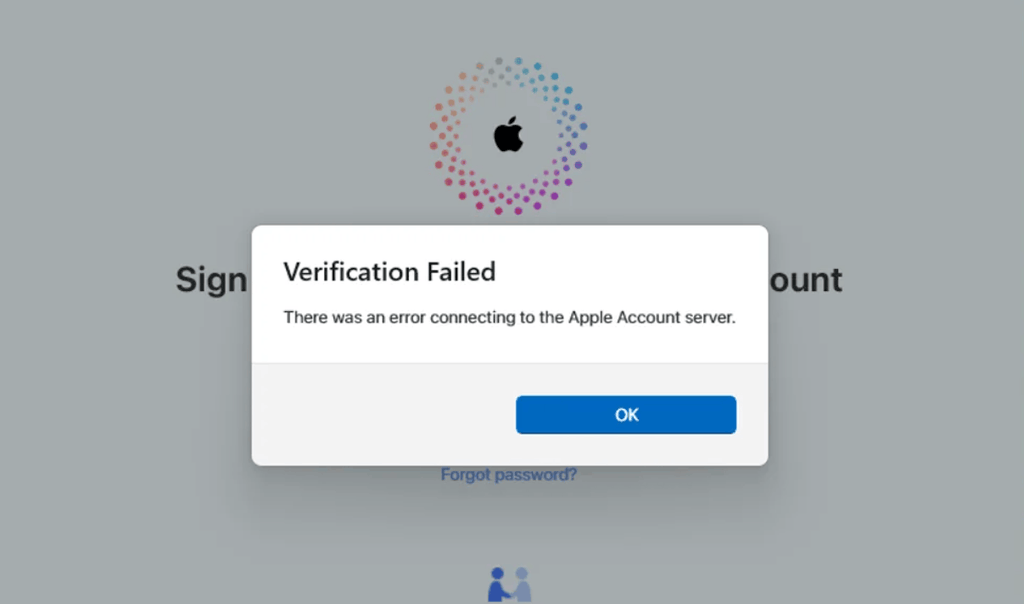
Multiple users spent hours or more on the call with Microsoft and Apple Support teams. But the problem really wasn’t resolved until they brought up the forum thread.
Try deleting the ADI folder first
This was present in the most trusted solutions, and it seems to work for a lot of people.
- Close iTunes
- Hold Windows + R
- Enter %programdata%\Apple Computer\
- Open the iTunes folder and permanently delete the “adi” folder.
- Reopen iTunes and log in. It rebuilds the folder automatically.
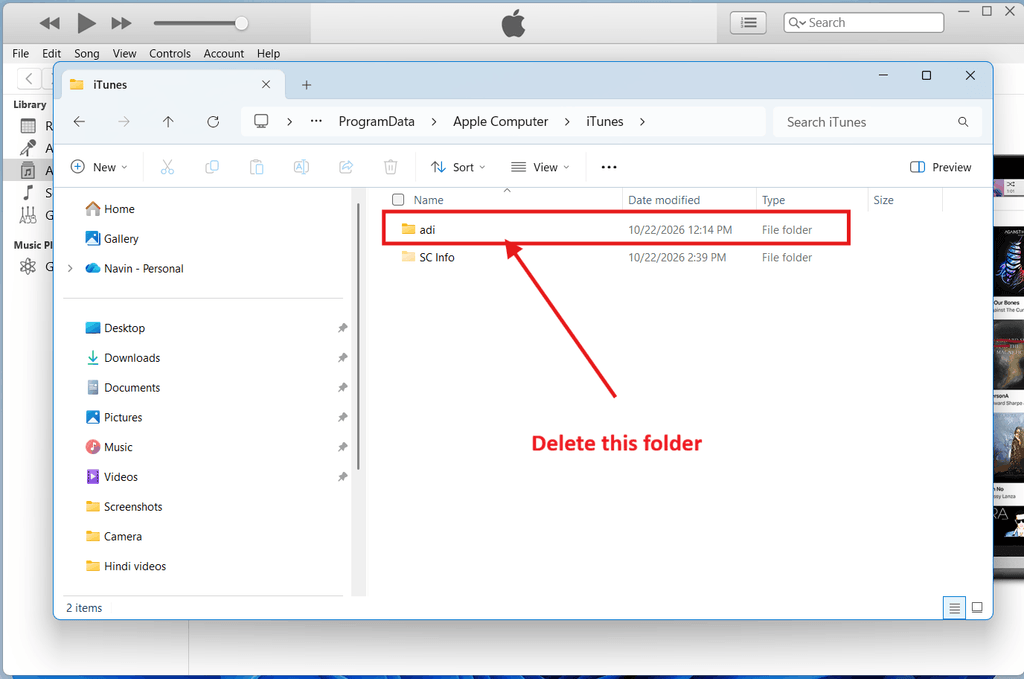
Several users got the two-factor code interface right after and were back in. Many others mentioned it only gave them one try to log in. So, enter your password carefully. Remaining users also reported it did not resolve anything at all. Try not to spend too much time on it
Related: Fix: iTunes Error Code 0xe80000a in Windows 10
Quick things worth two minutes each
- Toggle automatic time. Turn “Set time automatically” offand on in Windows. It solves it for many users.
- Run as Administrator. Right-click iTunes and select Run as administrator.
- Reset sync history. Go to Edit > Preferences > Devices > Reset Sync History.
- Reset the store cache. Go to Edit > Preferences > Advanced, and then reset the cache.
- Press Enter multiple times repeatedly. It sounds absurd, but a few users mentioned the verification screen eventually appearing after around 20 Enter hits.
Longer Shots
If all of the above solutions work, a few people had luck with more complicated and involved steps.
- Uninstalling iCloud for Windows.
- Running iTunes Helper from the iTunes folder.
- Running sfc /scabbiw and the two DISM repair commands from the admin interface
- Deleting the ADI folder and uninstalling the recent Windows update.
What did not work
This section of the article can save you time. These instructions failed for the users who tried them
- Removing old devices or changing your Apple password.
- Reinstalling iTunes, including from Apple’s site instead of the Microsoft Store.
- Disabling your antivirus or firewall.
- Switching to a phone hotspot, restarting the router, or flushing DNS.
- Eliminating Apple entries from the registry.
If you have applied these solutions already, that’s great to know, because the issue mostly isn’t from your end.
Related: Download iTunes on Windows 11 or 10 from Microsoft Store
It may fix itself automatically
Here’s the most fascinating part. Various users reported logging in again between October 18 and 20 without applying any changes. Sign-ins on Windows 11 systems began working again, and purchases went through, sometimes with a phone verification code. It all directly points to resolution being ongoing in the background, most probably on Apple’s servers.
The recovery is not always clear-cut at first. You may be allowed to log in and go to the store but still refuse to authorize a second system. iTunes can load but refuses to play to HomePods. Or you might get jumped back to the login screen after putting in your details. That loop is irritating, but it’s a distinct symptom from the original server error, which can usually mean resolves are going in the correct direction.
If you are still stuck at the sign-in screen
Wait for a day or two to try again before applying any drastic changes. In the meantime, you can purchase music on your Mac or a phone. In case iTunes for Windows 11 is still failing after that, reach out to Apple Support and mention to them it’s a widespread and global problem. The higher the number of reports they get, the harder it will be to ignore it.
Note: This information is from the Apple Support Community, not official Apple guidance, and nothing here is assured
Source: Apple Support Community thread.