
Microsoft rolled out the November 2026 non-security preview patch for Windows 11 on November 19. KB5132057 is out for Windows 11 versions 26H2 and 25H2. The update includes a lot of improvements and changes in Windows Search, File Explorer, Windows Hello, accessibility tools, the Run dialogue, and various other components of the operating system.
The update also reported issues involving Sage 50 Accounting, passkey authentication, Miracast connections, File History, and Windows Fax and Scan. Microsoft is releasing these new features slowly, so they might not be available on every eligible system all of a sudden.
Related: Windows 11 KB5132061 (November 2026) Update: What’s New, Fixes, and Download
Here, I am listing the build numbers, new features, fixes, and known issues that are mentioned in the release.
Build Numbers: Windows 11 KB5132057
The November 2026 preview patch is available for Windows 11 versions mentioned below:
- Windows 11 26H2: OS Build 26300.10075
- Windows 11 25H2: OS Build 26200.10075
This is an optional, non-security cumulative update. Users can find it through Settings > Windows Update > Check for updates.
Note: Optional preview updates are not mandatory.
What’s New in the November 2026 Preview Update?
New Windows Search Experience
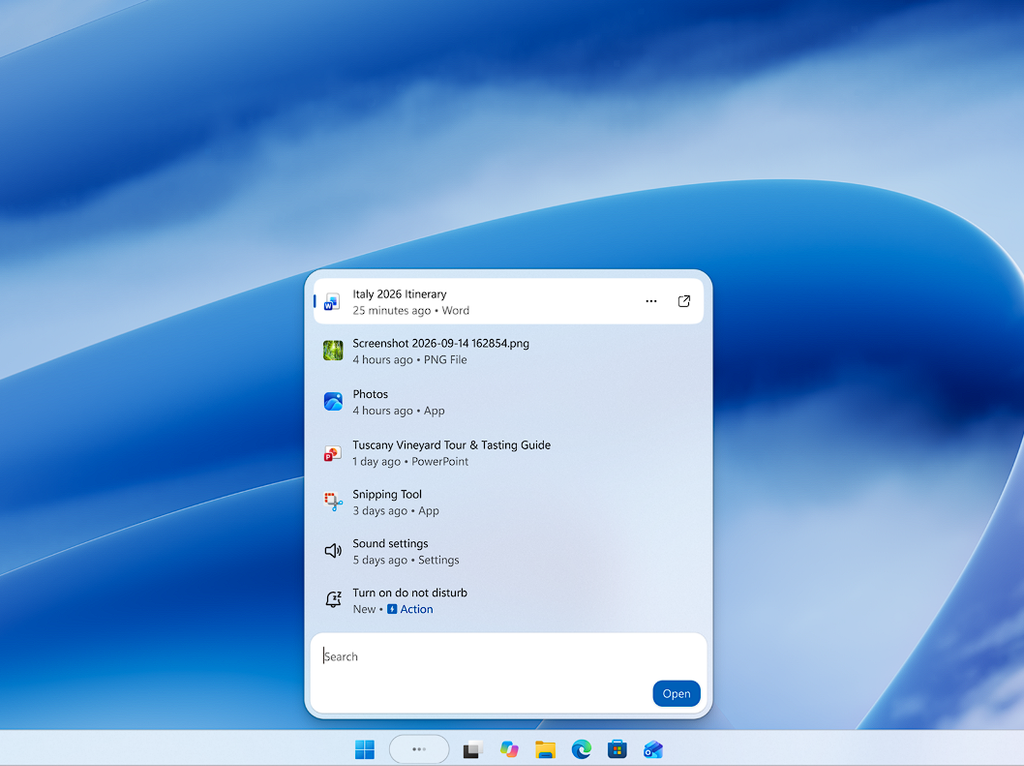
Windows Search has seen one of the most awaited changes in this release. The new design shows results in a simplified list, making it more convenient to search for files, applications and various other information.
It also integrates inline actions that enable users to execute some tasks directly from Search. For instance, you can turn on Bluetooth or Dark mode, mute the device, adjust screen brightness and organise open windows without going to Settings.
Search results can also display file previews and additional data, including the file creator, modification date and its location. The search system has enhanced recognition of spelling errors and synonyms. It can also give you quick answers related to subjects like stocks, weather and general facts.
The latest experience is initially available in the English language.
Automatic brightness adjustment by Windows Hello
Logging in with facial recognition in a dark-lit room can be hard. Windows Hello now has a feature to temporarily boost brightness during face recognition.
To turn it on, Open Settings > Accounts > Sign-in options > Facial recognition (Windows Hello). Enable the option named Automatically adjust screen brightness during face recognition.
Redesigned Run dialog
Microsoft has updated the Run dialog with a more user-friendly interface and improved usability. Users can enable the new design through Settings > System > Advanced by turning on New Run dialog.
Quick Settings in Xbox Mode
Xbox mode now has access to Quick Settings through its Gaming Task View navigation bar. Users can now access the taskbar from Quick Settings without interruption during a gaming session.
File Explorer search improvements
Searching from This PC in File Explorer now functions using the Windows indexing system. This allows the Search to be faster and more precise. Consequently, providing a more consistent experience with searches executed from File Explorer Home.
New widget notifications
Windows can now inform users when an application adds a new widget. Selecting the notification leads you to the Widgets Board and showcases the newly available widget, making it more convenient to add it.
More accessibility improvements
Microsoft has rolled out various changes for users who depend on accessibility features:
- The Pointer indicator makes it faster to locate the mouse pointer and touch.
- Magnifier now integrates a keyboard shortcut setting that controls whether Windows + Plus starts the feature. The latest help menu also enables users to access Feedback Hub and useful information.
- Narrator adds math-reading compatibility for Indonesian, Hungarian, Greek, Norwegian Bokmål, Polish, Russian, Swedish and Vietnamese.
- Live Captions now allows users to select whether to transcribe microphone audio, system audio, or both.
- Prompt for Toggle keys, Filter keys and Sticky keys now enables users to turn off a mistakenly triggered keyboard shortcut directly.
The update also enhances the reliability and performance of Voice Typing settings.
Other Windows improvements
The screen-capture indicator border colour now shifts from yellow to red, making an active capture session more convenient to recognise. Windows Settings also makes it easier to explore benefits and services linked with a Microsoft account.
Web sign-in now supports Microsoft Entra hybrid-joined devices. Relying on the organisation’s configuration, users can log in with compatible credentials such as a phone passkey, temporary access pass or FIDO2 security key.
Problems Fixed in KB5132057
Besides the new experience, Microsoft has resolved various existing problems.
- Miracast: Resolved an issue that could cause wireless display connection to use a lower resolution with some receivers.
- Sage 50 Accounting: Fixed a problem that could cause the application to close abruptly when choosing certain options.
- Restart and shutdown: Fixed a mistaken “Someone else using this PC” warning that could display even when no other user was logged in.
- Passkeys. Solved an error regarding cross-device passkey authentication on Android devices to show a “Something wen
- Windows Fax and Scan: Resolved an authentication issue that could stop connections to a fax server.
- File History: Fixed a problem where the restore user interface might not find backups when a drive was chosen as the backup location
- RemoteApp: Fixed an issue that could include an extra character at the start of Japanese text typed in RemoteApp applications.
- Activation: Resolved an issue affecting activation of Windows IOT Enterprise LTSC devices through Token-based Activation or Key Management Service.
The update also deals with a boot failure or TPM initialisation issue on some ARM-based systems using a TPM 2.0 Command Response Buffer interface.
Known Issue in the November 2026 Preview Update
Microsoft has reported a known issue affecting SQL Server linked-server connections. After installation of the Windows updates rolled out on October 13, 2026, or later, connections built through some particular SQL Server linked-server queries might stay open after the queries complete.
The problem affects OLE DB connections to external databases and includes known cases involving PostgreSQL and Oracle. As more queries run, these connections can gather and eventually affect the server’s performance.
Microsoft has offered a resolution for affected enterprise environments through Microsoft Official Support. Administrators may restart the SQL service or temporarily close an identifiable idle connection. However, these actions can interfere with active operations, and the issue may return
Microsoft is currently developing a resolution. This issue is mainly concerned with the affected server and enterprise environment, not ordinary Windows home users.
How to Download and Install KB5132057
In case you prefer to install the November preview update, follow the steps mentioned below
- Hold Windows + I to go to Settings.
- Choose Windows Update from the left pane.
- Click Check for updates.
- Find the November 2026 preview update, KB5132057.
- Choose Download and install, if the option is provided.
- Restart your system when Windows prompts you.
As this is an optional preview update, it may not be installed automatically on every system. The availability of slowly released features can also vary between different devices.
Final Words
The November 2026 preview update receives multiple useful changes and improvements to Windows 11, specifically the modified Search experience, quicker File Explorer searches, improved Windows Hello sign-in, and accessibility advancements. It also resolves a number of authentication, display, application, and backup-related issues.
Users currently running Windows 26H2 or 25H2 can check Windows Update for KB5132057 if they prefer to try the optional release features.
Though, users using business systems should check Microsoft’s documented SQL Server known issue before installation.