
Microsoft rolled out KB5127648 on October 13, 2026, and gamers are mostly discussing the KB5127648 mouse stutter fix for games. If your cursor twitches while you play a game, the recent update might be the fix. This update is a cumulative patch for Windows 11 versions 24H2, 25H2, and 26H2, and it’s the first cumulative update for 26H2. Additionally, it includes improvements to File Explorer, Bluetooth, and Copilot key remapping, and it resolves various problems that appeared after the latest September updates.
The update consists of the changes from the optional September 22 preview update (KB5124010). You don’t need to install that one again. The build numbers are mentioned.
| Windows 11 version | Build after KB5127648 |
| 26H2 | 26300.9711 |
| 25H2 | 26200.9711 |
| 24H2 | 26100.9711 |
One more piece of information for 24H2 users: this update is the last for Windows 11 Pro and 24H2, as the end of updates on October 13. Education and Enterprise editions stay supported until October 12, 2027.
Mouse stutter fix in games (KB5127648)
Microsoft’s notice about the fix
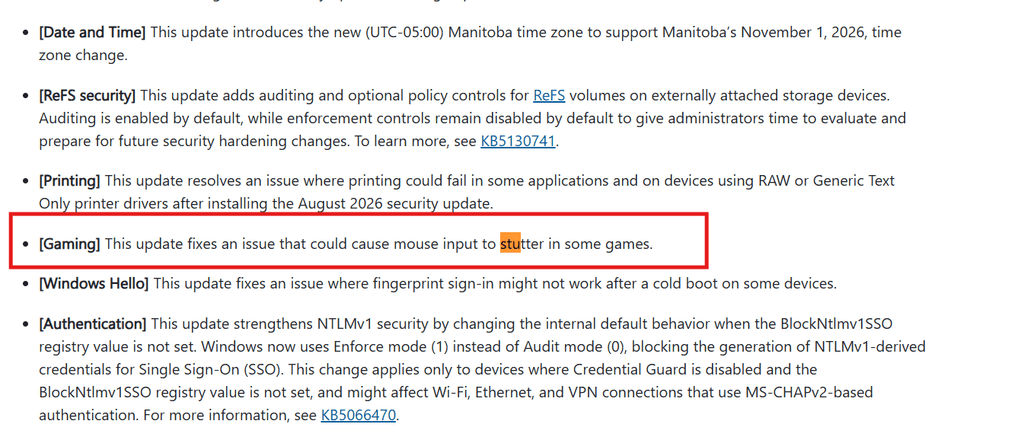
Under the gaming category, Microsoft’s official notes state that the update fixes a problem that causes the mouse to stutter in various games. That is all mentioned. Microsoft didn’t release any official name for the cause, the hardware, or the affected games, so nobody apart from Microsoft can discuss how many users were experiencing the problem or the long the issue continued.
Useful Update: This resolution was not included in the September optional preview update. Its first release is still KB5127648. If you updated the September preview and are still facing the stutter, this update is going to solve your problem.
What to do if you are still experiencing the stutters
Microsoft labels it a resolution for “some games,” so it will not fix every distinct stutter. Normal steps that can help include:
- Restart your system after the update
- Update any mouse software and your graphics driver.
- Check the mouse by plugging it into different USB ports, or a different game, to rule out any hardware complications.
New feature in Windows 11 KB5127648
Microsoft is releasing most updated features slowly, so you may now watch them all at once after installing.
Copilot key remapping
If your system has a Copilot key, you can now customise it to act as the Context menu key or the right Ctrl key. The option is present under Settings > Bluetooth & devices> Keyboard.
Improvements in File Explorer
The preview panel now manages downloaded files separately. Non-HTML files and PDFs can preview on their own; however, HTML files get an updated Preview anyway button after the alert. File Explorer now collects data about whether the sections were collapsed or expanded, and thumbnail previews are more trustworthy in cloud files.
Bluetooth enhancements
Microsoft mentions Bluetooth is now more reliable. Microsoft Windows should preview a more precise connection status for disconnected accessories, better compatibility with microphones, and be more steady with shared audio devices and LE Audio. Volume pop-up appears on screen when using the volume buttons on a Bluetooth headset during voice calls.
Other Changes
- Open apps maximized – new accessibility setting.
- Slideshow transitions are smoother on new accounts, and DIB image files can be set as desktop backgrounds.
- An updated Magnifier toolbar with refreshed icons.
- WIFI profiles already saved in the system can now be reused by the Windows Recovery Environment.
- Emoji 17.0
- Regular release of updated Secure Boot certificates and refreshed AI components.
Additional bugs resolved by KB5127648
Windows Hello fingerprint log-in
The update fixes fingerprint failing to work after a cold start on many devices.
Black screen after sign-in
Explorer crashes repeatedly or fails to start after sign-in, stuck at a black screen. This was mostly noticed on Azure Virtual Desktop hosts using Fsilogix. Microsoft labels it as resolved.
Apps crashing because of AC-3 audio
Various applications that depend on AC-3 (Dolby Digital) decoding could crash suddenly after installing the September update. Microsoft also labels it as resolved.
Printing and Always On VPN
Always On VPn connections that fail to connect and get stuck on “Connecting” after the September update have now been fixed. The update also addresses the issue regarding printing failure on devices using Generic Text Only printer drivers or RAW, that started after the August 2026 security update.
Storage
Many virtual disks fail to come online after some security updates, which could take distributed workloads offline. Administrators should fix this.
Security fixes in the October 2026 update
In this record-breaking Patch Tuesday, Microsoft products fixed 1,400 vulnerabilities. Counts can differ depending on how the security firms tally. Three of them are zero-days: two were publicly revealed before a fix was available, and one is actively exploited.
The urgent one is CVE-2026-96951. It is a Windows Shell flaw that allows attackers to bypass the point of the Web security feature. Microsoft states that it is being exploited in attacks. The reason is strong enough not to postpone the update.