
KB5127936 is an early preview update for Windows 11 that eventually allows to customise right-click menu according to you. Microsoft rolled it out on October 28, 2026, and it includes various features developed for the November Patch Tuesday update. Alongside the context menu, it provides additional security changes, new recovery options, and improvements in File Explorer.
Microsoft is releasing most of these updates slowly, so it may not display on your system right away. Windows 11 24H2 lacks this update, as that version is no longer getting updates from October 13. Every feature will be provided in all supported systems on November 10, so installing the preview version is your preference.
Windows 11 version Build after KB5127936
26H2 26300.9818
25H2 26200.9818
New features added in KB5127936
Right-click menu is now completely customizable.
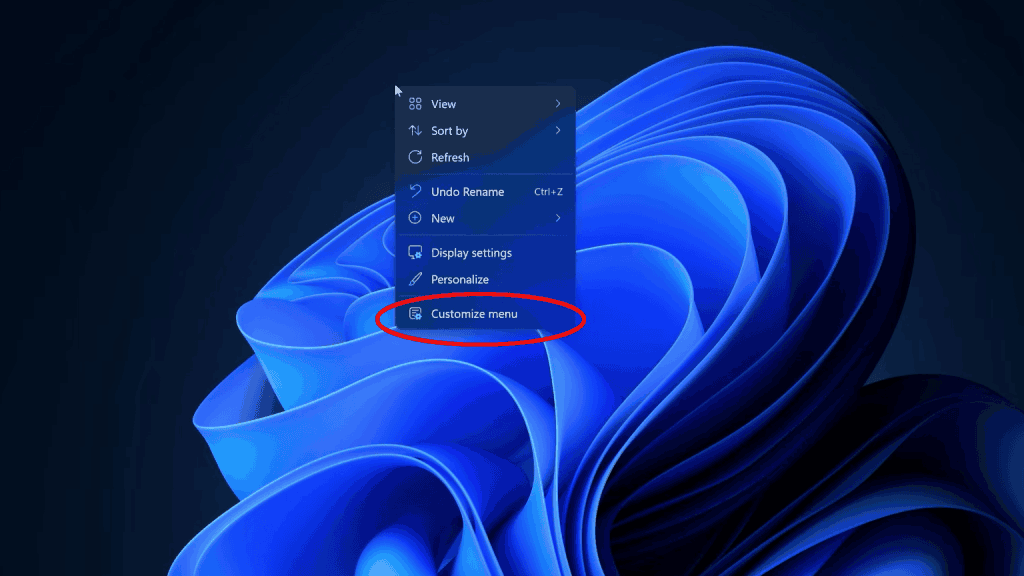
This is the primary change. A new and updated Customize menu feature is now visible in the File Explorer right-click menu that leads you to the location: Settings > Personalization. You can apply multiple customization tweaks there. For instance:
- Disabling options such as Rotate image, Copy as path, Create shortcut, Print, and Send.
- Display items such as delete, share, rename, copy, paste, and cut inside the menu, making it shorter
- Hide menu entries included by other apps, such as Edit in Notepad or Open in Paint, or arrange them in a group through App extensions Submenu.
- Display the old context menu straight away without pressing and holding Shift.
Legacy applications like 7-Zip are still accessible from the old menu panel. Moreover, Microsoft has really found an edge over its competitors by making the menu appear more quickly.
Improvements in File Explorer
- Doesn’t matter wherever you begin searching, Search results are now displayed in a more consistent layout.
- Entering a tilde (~) in the address bar will guide you to your profile folder, so ~\AppData opens AppData faster.
- The Folder interface dialogue started getting dark mode compatibility.
Cloud rebuilds and new recovery options
If Windows is not able to launch, the Windows Recovery Environment can now reconnect to an already saved Wi-Fi connection and download the latest copy of Windows Update on its own. This is turned on automatically and stores your settings and files.
An update Cloud rebuild feature can reinstall Windows 11 with drivers and image obtained from Windows Update, even when the system can’t boot on its own. You don’t need a new USB drive. You can enable it from Settings > System > Recovery.
Memory Integrity is enabled by default
On compatible systems, Memory Integrity ( a core security feature) is not turned on automatically. Various reports connect it to a negligible drop in game performance, but Microsoft has not mentioned any complications or error numbers. If you want to review it, Open Windows Security > Device security > Core isolation.
More features
- Microsoft Edge now runs immediately when it is already present in the background running applications by leveraging a feature named accelerated app launch.
- Xbox mode includes a navigation bar to exit the interface and go back to the desktop.
- Phone Link allows you to display over a latest message in the Start menu to take a look at it.
- Magnifier app now gets per-monitor zoom and contrast theme toggle.
- Live Captions gets an update to feature screen reader audio.
- Windows includes IPv6 CLAT compatibility for Ethernet and Wi-Fi.
Tips to get KB5127936
Go to Settings > Windows Update and seek out the 2026-10 Preview Update (KB5127936). In case it is currently displayed, enable the Get the latest updates as soon as they are available option. It also increases the probability of you receiving the new features. You can also download it from the Microsoft Update Catalog, though the offline file is quite big (around 5 GB). If the installation fails, read our articles related to fixing update installation issues on Windows 11.
Conclusion
If you want the updated right-click menu interface, Explorer tweaks, or the Cloud rebuild now, then yes. Optional updates are known to be in development, and Microsoft mentioned no known issues as of now. If you want to wait till the official release is out, nothing is lost, as the same features will launch on November 10 with the Patch Tuesday update.
Keep in consideration that the gradual rollout and Memory Integrity change mean you system may act differently from other systems.