
Microsoft has reported a printing issue affecting several Windows 11 systems after installation of the November 2026 hotfix KB5132043. The problem involves a compatibility difference with Forcepoint DLP Endpoint Agent, which organisations use to provide security to sensitive data.
Microsoft has also reported an application compatibility problem following the same update. Read our coverage of the KB5132043 hotpatch error 0xC0000099.
On vulnerable systems, the Print Spooler service may experience failure in launching. Consequently, Windows hotpatch users might find printing options greyed out or face errors when choosing a printer.
Microsoft says the problem affects Windows 11 version 24H2 and later. Here I am listing some known details and what administrators can do in the scenario.
What Is the KB5132043 Printer Problem?
The November 10, 2026, hotpatch KB5132043 has brought up printing failures on some managed Windows 11 systems functioning Forcepoint DLP Endpoint Agent.
Microsoft’s service alert recognises a compatibility issue between the Forcepoint security software and the Hotpatch.
BleepingComputer also reported Microsoft’s confirmation of the KB5132043 printing issue, including the Print Spooler failure affecting Forcepoint users.
Affected users may encounter:
- Print options greyed out in applications.
- Errors while selecting a printer.
- The Print Spooler service failing to launch.
- Virtual and physical printers becoming unavailable.
Moreover, several administrators have complained that every installed printer shows Not connected, including the Microsoft Print to PDF option.
Microsoft has documented the Forcepoint-related printing problem, but the global community reports should not be considered as evidence that every Windows 11 system is affected.
Which Windows 11 Versions Are Affected?
Microsoft states that Windows 11 version 24H2 and later are affected when the system has the specific hotpatch and Forcepoint DLP Endpoint Agent.
The issue is linked to KB5132043, despite the standard November Patch Tuesday update KB5132061.
To verify your installed Windows build:
1. Hold Windows + R.
2. Enter winver and hit Enter.
3. Confirm the OS build shown in the About Windows interface.
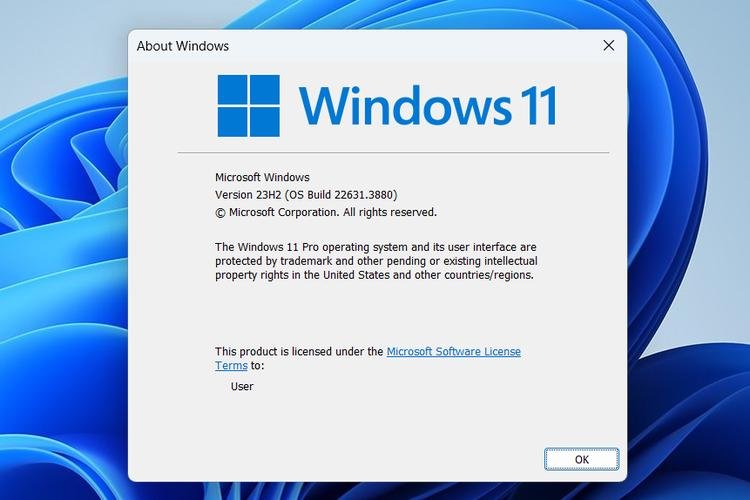
The November hotpatch builds include 26100.9911, 26200.9911 and 26300.9911. The equivalent standard November cumulative update builds end in .9974.
You can also go to Settings > Windows Update > Update history and find KB5132043.
How to Restore Printing After KB5132043
In case your organisation runs Forcepoint DLP Endpoint Agent, and printing has stopped working, connect to your IT administrator before applying any changes to Windows updates or security software.
1. Confirm the Print Spooler failure
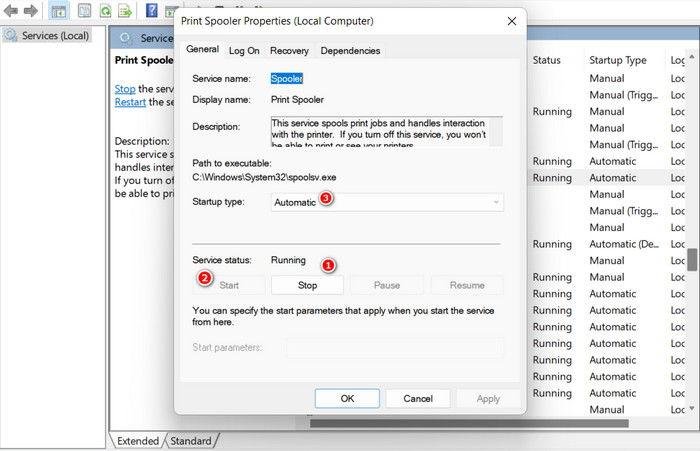
An administrator can open PowerShell and enter:
Get-Service -Name SpoolerIf the service is failed, this may help recognise the printing error.
Another convenient command is:
Get-PrinterIt can display whether Windows can communicate with the installed printers.
Administrators should also inspect Event Viewer under Windows Logs \> System and the Microsoft-Windows-PrintService logs for issues occurring during the Print Spooler launch.
2. Check the Forcepoint Endpoint Agent
As Microsoft reports a compatibility issue with Forcepoint DLP Endpoint Agent, administrators should analyse the installed agent’s configuration.
Forcepoint has offered a temporary resolution through its customer support portal. Organisations should get the applicable guidelines straight from the Forcepoint and follow their IT security instructions.
Try not to randomly turn off endpoint protection or apply any changes to security policies on production systems.
3. Consider moving away from the hotpatch
Microsoft’s hotpatch recovery instructions offer a method for devices facing sudden issues: eliminate the affected hotpatch, install the latest standard cumulative update, and restart your system.
For this November problem, administrators can consider replacing KB5132043 with the standard November cumulative update KB5132061 after testing the recovery procedure on affected devices.
This must be checked on a small group of vulnerable systems before wider execution. Managed devices should be managed through the Windows Autopatch update policies or the organisation’s Intune.
Check Microsoft’s official KB5132061 release documentation for supported Windows versions, build information and installation instructions.
Has Microsoft Released a Permanent Fix?
As of November 24, 2026, Microsoft has reported the Forcepoint-related printing issue, but has not confirmed a permanent resolution or release date.
Forcepoint’s temporary resolution is present to its customers through its support portal.
The problem should not be mistaken for the particular printing issues linked to the regular November cumulative update. Microsoft separately differentiate the KB5132043 hotpatch and the Forcepoint compatibility problem.
Conclusion
Windows 11 KB5132043 can interrupt printing on some system functioning the Forcepoint DLP Endpoint Agent. The error happens when the Print Spooler service cannot launch, leaving users not being able to configure or access their printers.
Organisations facing this issue should check the installed hotpatch, connect to their IT administrators, and get the temporary resolution from Forcepoint. Try not to remove security updates or turn off endpoint protection without a validated or approved recovery plan.