

Access Automatically Boot USB Drive in Windows To Go Startup
We have explained you in our previous article that how you will create a shortcut of Windows To Go Startup… Read More »Access Automatically Boot USB Drive in Windows To Go Startup
We have explained you in our previous article that how you will create a shortcut of Windows To Go Startup… Read More »Access Automatically Boot USB Drive in Windows To Go Startup

This article will take you through the different tips through which you can know BIOS and UEFI Firmware Version on Windows 8. Before… Read More »How to Know BIOS and UEFI Firmware Version on Windows 8 / 10

Start Screen is a collection of most used apps which can be customized by a user according to his need. Start… Read More »How to Create Default Start Screen Layout in Windows 8.1

We expect that you would be aware of the fundamentals of VPN we begin to write the process to create… Read More »How to create Virtual Private Network Connection in Windows 8.1

Children love to use Windows App in their computers but they cannot purchase the apps by themselves. They need elders… Read More »How to Purchase Windows 8 / 10 Apps from Store for Child using your Account
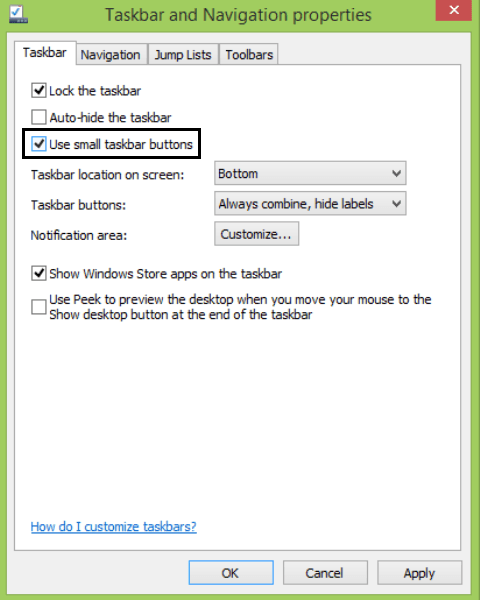
Reduce Pinned Icons Size on Windows 8.1 Taskbar. – Windows 8.1 has tried to solve many loopholes of its previous… Read More »How to Decrease Pinned Icons Size on Windows 8.1 Taskbar
Method and step tp Keyboard Shortcut to Launch USB Flash Drive in Windows 10, 8. – We often use a… Read More »Create Keyboard Shortcut to Launch USB Flash Drive in Windows 10, 8

Run command takes you directly to the necessary application or document whose path is known to you within a few… Read More »How to Make Run shortcut on Desktop in Windows 8 / 10

To open Device Manager, there are several ways on Windows 8 and 8.1. Here we will write all possible processes… Read More »7 Ways to Open Device Manager on Windows 8 and 8.1

Block Applications by Windows Firewall New Rule – Windows bring many new features to the techno-system. One of the safest… Read More »Block Applications by Windows Firewall New Rule – Guide

How to Center Icons on Windows 8 Taskbar. – Windows 8 taskbar is disposed on the lowermost segment of Windows 8 machine’s… Read More »How to Center Icons on Windows 8 Taskbar – Tips

Include an Application to Context Menu on Windows 10, 8 – There are certain apps on which we practice quite… Read More »Include an Application to Context Menu on Windows 10, 8

You can increase or decrease cursor thickness on Windows 8 PC in easy way according to your eyesight. This makes… Read More »Increase and Decrease Cursor Thickness on Windows 8 Tips

Windows Defender Scheduled Scan – If Windows Defender is on then it will let know you whenever a spyware and… Read More »Windows Defender Scheduled Scan to Run Automatically on Windows 10, 8 Tips

User Account Control (UAC) is a Windows safety caring feature that keeps your system secure. The default mode in UAC… Read More »Prevent UAC Prompt for Certain Programs on Windows 8

There are certain apps in Windows 8.1 which require your location to give you the exact results and many times you have… Read More »How to Configure Location Settings on Windows 8.1 – Tips

When you write click on any file or folder on your Windows PC you get the context menu where you… Read More »Add OneDrive to Send to Extended menu in Windows 10/8.1 – Tips

A System Diagnostic Report or System Health Report on Windows 10, 8.1 PC enlists the performance of critical components for… Read More »How to Generate System Diagnostic Report in Windows 10, 8.1 – Tips