

Windows 10 Start Menu – Tips to Customize
This article will tell you about tips to customize your Windows 10 Start Menu. When Microsoft changed the version of… Read More »Windows 10 Start Menu – Tips to Customize
This article will tell you about tips to customize your Windows 10 Start Menu. When Microsoft changed the version of… Read More »Windows 10 Start Menu – Tips to Customize

How to Create a Homegroup in Windows 10 Quick and Easy – One of the biggest advantages of Windows 10… Read More »How to Create a Homegroup in Windows 10 Quick and Easy

Windows 10 being the new operating system in the techno world, many users want to know some of the basic… Read More »How to Customize Date and Time Formats on Windows 10

On your Windows 10 PC, you get the power button at the lower part of the start menu. When you click… Read More »How to Enable Hibernate on Power Button in Windows 10 – 5 Steps

Start menu on Windows 10 accents you add or remove items like Files, Folders, Control Panel Applets, Images, Videos, applications… Read More »How to Add or Remove Items on Start Menu on Windows 10

Windows 10 Store is equipped with customization menu to make it more meaningful for you. The store on the latest… Read More »How to make Windows 10 Store More Favorable for You

There are 4 ways using which you can Search Items on Windows 10. In short, Windows 10 provides you 4… Read More »How to Search Items on Windows 10 – 4 Ways

On Windows 10, you can easily change Account Picture through Start Menu. On the lower left of start Menu, you… Read More »How to Change an Account Picture on Windows 10 – Easy Steps

Windows 10 has brought back the old Start Menu with enhancement. When you click on the Start Menu you view… Read More »How to Shift From Start Menu to Start Screen on Windows 10

How to Stop Snap View on Windows 8 – Tips – When you work on two programs, snap view permits… Read More »How to Stop Snap View on Windows 8 / 8.1

Windows 10 Taskbar has come with lots of more features and lets customize you as per your choice. From Taskbar… Read More »How to Customize Windows 10 Taskbar – Complete Guide
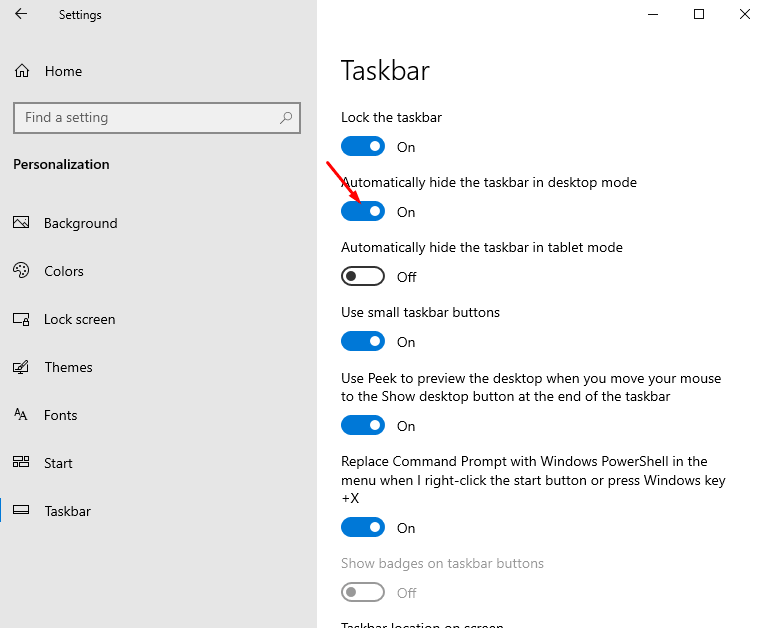
Windows 10 provides certain possibilities through which you can customize your taskbar in multiple ways. ‘Auto hide the taskbar’… Read More »How to Hide and Show Windows 10 Taskbar Automatically

Windows 10 bangs! Microsoft has unveiled the Windows 10 Technical Preview version on its official website and put the download link.… Read More »How to Download and Install Windows 10 Technical Preview – Complete Guide

Most of you are using the default scheme of mouse pointer and cursor set by Windows 10. In the Windows… Read More »How to Customize Mouse Pointer on Windows 10 and Change Scheme

Enable / Disable Built-in Hidden Administrator Account in Windows 8.1 – After the commencement of Windows Vista, there is a… Read More »Enable / Disable Built-in Hidden Administrator Account in Windows 8.1|10

Procedures to Change Color and Font of Command Prompt on Windows 10, 8 through steps. – Working in Windows 10,… Read More »How to Change Color and Font of Command Prompt in Windows 10, 8

You must have noticed one thing in Internet Explorer 11 that when you type a search query in the address… Read More »How to Disable Enhanced Search Engine Suggestions in IE 11

In Windows 10, 8.1, there is a Windows To Go Startup Option which lets users turn on or off always… Read More »How to Create Windows To Go Startup Options Shortcut Manually