

How to Set Windows 8 as Default in Dual Boot Computer
Sometimes users want to install more than one operating, as latest and its previous version,… Read More »How to Set Windows 8 as Default in Dual Boot Computer
Sometimes users want to install more than one operating, as latest and its previous version,… Read More »How to Set Windows 8 as Default in Dual Boot Computer

In Windows 8, the Startup feature is used to run special programs automatically during desktop loading. An Advantage… Read More »How to Add or Remove Programs in Startup in Windows 8

Windows 8, the latest Operating Introduced by Microsoft, is available in dual preview as Consumer… Read More »Windows 8 Metro Control Panel Features Developer Preview

Windows 8 often displays default lock screen background on the Startup screen indicating time and… Read More »How to Remove lock screen in Windows 8 Tips Stepwise

Both versions of Windows 8 (Developer or Consumer) display a new feature Metro Start Screen at… Read More »How to Disable Metro Start Screen in Windows 8 Tips

Command Prompt is known as DOS. It is an integral feature in all Windows operating… Read More »How to Run Command Prompt as Administrator in Windows 8

Microsoft has enabled a tool in Windows 8 for dealing with the issue of Family… Read More »How to Activate Family Safety in Windows 8, Tips, Stepwise

Windows 8 displays sign-in option during startup. At the same time, it asks you to enter Windows live… Read More »How to Sign In Windows live, Microsoft Account in Windows 8

Windows 8 beta version offers a lot to its On-net or Off-net users. If you… Read More »How to Add Email Accounts to Windows 8 Mail App

How to Go into Safe Mode in Windows 8 – In Windows 8, we witness… Read More »How to Go into Safe Mode in Windows 8 Tips Stepwise

Windows 8 has come with modern Advanced Task Manager. It contains several advance features like detailed… Read More »How to open Windows 8 Modern Task Manager

Whenever we install Windows 8 (beta) in our systems, the appearance of the Windows amazes… Read More »How to use Windows 8 Charms Bar / Introduction

The act of Installing or Uninstalling Software is something that an average user looking for.… Read More »How to Uninstall Windows 8 from Dual Boot in PC, Laptop

Quick Launch toolbar on Windows 8 Taskbar is an important tool to open different programs… Read More »How to Enable or Disable Quick Launch Toolbar in Windows 8

As you know secure log in depends on correct insertion of the password in the… Read More »How to Set PIN Log on in Windows 8
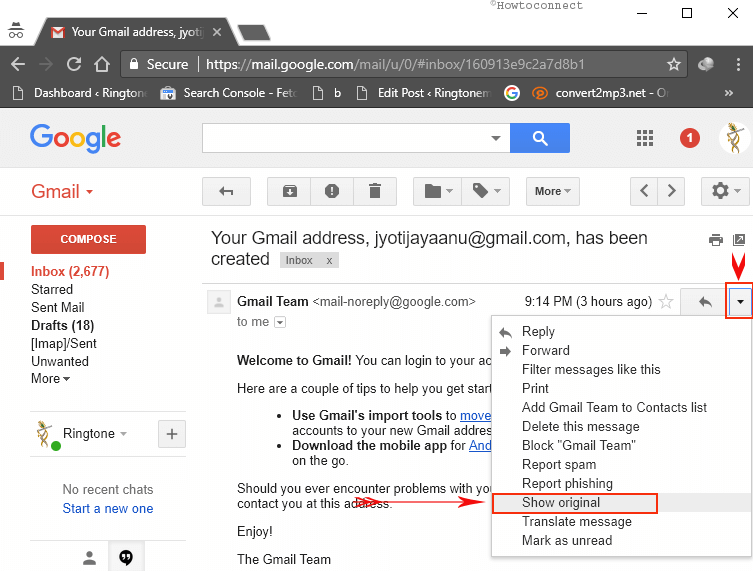
How to know IP address of Email sender in Gmail Account: Whenever you receive an… Read More »How to know IP address of Email sender in Gmail Account

Microsoft has added many features in Windows 8 to make it more useful and attractive… Read More »How to make Internet Explorer in Windows 8 Easy Working

Windows 8 has been officially launched in 2012 worldwide. You can download ISO images of Windows… Read More »All About Windows 8, How to, Tips, Tricks