

How to update Windows 8.1 Preview Step by Step
Windows 8.1 preview is the first update of the windows 8 operating system. Now Microsoft has made available as a… Read More »How to update Windows 8.1 Preview Step by Step
Windows 8.1 preview is the first update of the windows 8 operating system. Now Microsoft has made available as a… Read More »How to update Windows 8.1 Preview Step by Step

The Windows 8 Start screen is very useful for windows 8 based touch screen tablet or laptop. But… Read More »Tips to boot Desktop without Start Screen in Windows 8.1

Every windows version lets you create administrator based user account with a strong password to make data safe and… Read More »Make Windows 8 Secure with Password Protect Hard disk and BIOS modify

Notepad classic is a free app of windows 8 and works as a text editor. It does all… Read More »Windows 8 Best Free Text Editor: Notepad Classic

Configure Firewall Settings in Windows 10, 8 – Firewall is a protection system for keeping the PC secure from the… Read More »How to Configure Firewall Settings in Windows 8 Step by Step
The next generation Window 8 Operating System has become so popular that everyone wants to use it. Even the Mac… Read More »How to install Windows 8 on Mac
The Windows 8 has seen a host of new features and changes and this also includes many removals which range… Read More »How to get back the missing features in Windows 8
Now, when you are going to buy a new PC or a laptop, chances are that you are going for… Read More »Tips to get faster access in windows 8

There are several changes being done in Windows 8 as compared to its earlier version. Some of the features of… Read More »How to get 6 missing features in Windows 8

The OneNote app for Windows 8 is a new officially launched application for the users who want to keep their… Read More »How to use OneNote app in Windows 8 Step by Step
Many problems arise especially when we do not know with which file type we are dealing with. The files which… Read More »Ways to identify Unknown file types
When the full functionality are offered by any computer system, everyone becomes its proud owners. This article dedicates itself in… Read More »5 Simple ways to tweak Windows 8

You can use the photo application of the Metro UI of the new Windows 8 to browse and search photos… Read More »How to see photos without actually opening your account on Facebook, G-mail in Windows 8
The two finger scrolling is an awesome feature and makes the navigation on any page much easier. People who use… Read More »How to Enable two Fingers Scrolling in Windows 8

There comes some time when you are trying to run an application and that application is not working either because… Read More »5 Important Tips for when your Windows 8 is not Working Properly

Windows 8 has a lot of new things in it like the new Start Screen, a nice interface and Of-course… Read More »How to use Cool Copy Feature of Windows 8

We are familiar with a reality that Windows 8 is fairly different from earlier version of Windows OS.… Read More »Control and Analyze Services with Windows 8 Task Manager
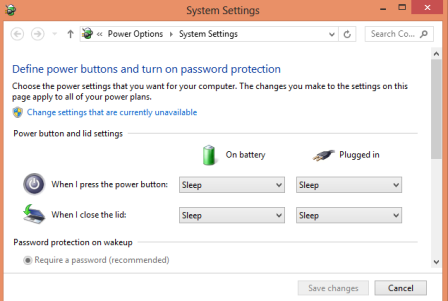
There is no easy access to shutdown, hibernate, sleep and the restart options in the newest rendition of Windows… Read More »How to Change Windows 8 Power Button to Shutdown, Sleep or Hibernate